Micro-Frontend Advanced 2 - Local Development Guide
After building our microservices front-end application using single-spa, there’s actually a problem that will always trouble us, That is how to develop effectively? How to be as simple and easy to use as our usual front-end application development. Today using umi sub-module as an example, hoping to give everyone an idea
Today I’ll introduce one method, hoping it helps everyone.
Module Loader
Do you remember my previous module loader, https://alili.tech/archive/1a60cede/
We just need to encapsulate the original module loader into an npm package.
Then when we develop sub-module projects, run our loader 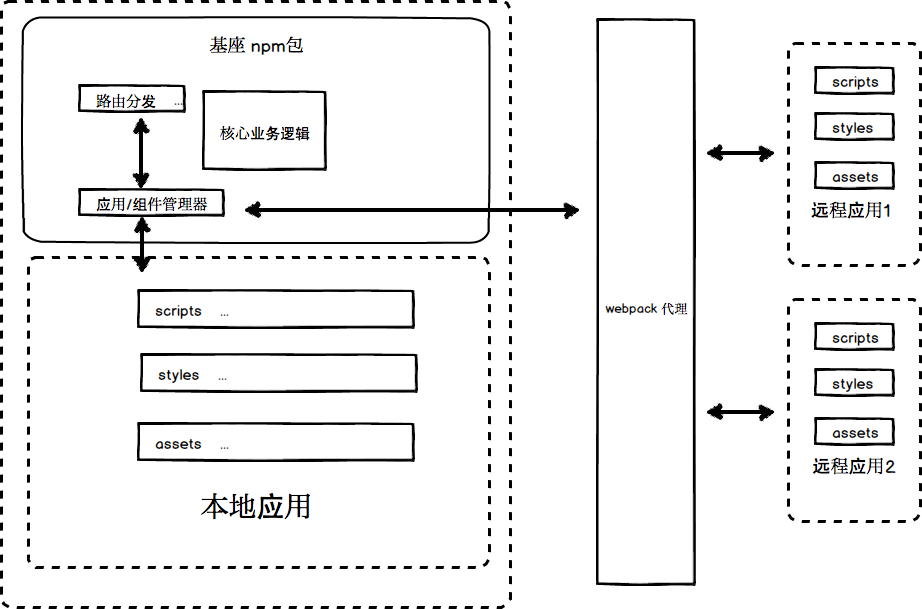
// umi src/app.js
import bootstrap from '@demo/demo-module-dev-loader' // Encapsulated npm package
import store from 'store'; // Our store file for communication

export async function render(oldRender) {
  if (process.env.NODE_ENV === 'development') {
    const main = oldRender();
    const res = await window.fetch('./project.json');
    let currentProject = await res.json();
    bootstrap({
      main,
      store,
      prefix: currentProject.prefix
    });
  } else {
    oldRender();
  }
}
module-dev-loader
Our demo-module-dev-loader will also have a Bootstrap.js file, we make some small modifications to it.
import * as singleSpa from 'single-spa';
import { registerApp,registerLocal } from './Register'

export default   async  function bootstrap (local) {
    // Get our project configuration file, but we don't have this file locally.

    // We need to proxy to our online test environment through webpack to get this file
    // We need to proxy to our online test environment through webpack to get this file
    // We need to proxy to our online test environment through webpack to get this file

    // Important things said three times
    const projectConfig = await window.SystemJS.import('/project.config.js')
    const res = await window.fetch('/project.json')
    const currentProject = await res.json()
    let {projects} = projectConfig;

    // Remove current project, because current project will use registerLocal method to register
    projects = projects.filter(ele => ele.name !== currentProject.name)

    // Register our online test environment
    for (let index = 0; index < projects.length; index++) {
        const project = projects[index];
        await registerApp({
            name: project.name,
            main: `${project.main}`,
            store: project.store,
            base: project.base,
            prefix: project.prefix
        });
    }
    // Key point!!!
    // Register locally developing module
    local && registerLocal(local)
    singleSpa.start();
}
registerLocal Method Display
// Register.js
// Made some deletions on original registerApp, general principle is exactly the same
export function registerLocal({base,main,prefix,store,name='local'}){
  // Import store module
let storeModule = {}, customProps = { globalEventDistributor: globalEventDistributor };

storeModule = store && { storeInstance: null };

  // Register application to event distributor
  if (storeModule.storeInstance && globalEventDistributor) {
    // Extract redux storeInstance
    customProps.store = storeModule.storeInstance;
    // Register to global
    globalEventDistributor.registerStore(storeModule.storeInstance);
  }

  singleSpa.registerApplication(name, async ()=> main, base ? (() => true) : hashPrefix({prefix}),customProps);
}


// Original registerApp method, exactly the same as before, no changes.
// For convenient comparison with registerLocal, so listed for everyone's reference
export async function registerApp(params) {
// Import store module
let storeModule = {}, customProps = { globalEventDistributor: globalEventDistributor };

// Try to import store
try {
    storeModule = params.store ? await window.SystemJS.import(params.store) : { storeInstance: null };
} catch (e) {
    console.log(`Could not load store of app ${params.name}.`, e);
    // If failed, don't register this module
    return
}
  // Register application to event distributor
  if (storeModule.storeInstance && globalEventDistributor) {
    // Extract redux storeInstance
    customProps.store = storeModule.storeInstance;

    // Register to global
    globalEventDistributor.registerStore(storeModule.storeInstance);
  }

  singleSpa.registerApplication(params.name, async ()=> await window.SystemJS.import(params.main), params.base ? (() => true) : hashPrefix(params), customProps);

}
umi Plugin
Our umi plugin also needs modification
// Still original element loading method
  const domElementGetterStr = `
      function domElementGetter() {
        let el = document.getElementById('submodule-page')
        if (!el) {
          el = document.createElement('div')
          el.id = 'submodule-page'
        }
        let timer = null
        timer = setInterval(() => {
          if (document.querySelector('#submoduleContent.submoduleContent') && !document.querySelector('#submodule-page')) {
                document.querySelector('#submoduleContent.submoduleContent').appendChild(el)
                clearInterval(timer)
          }
        }, 100)

        return el
    }`


// Import single-spa-react module in umi
// And encapsulate our rootElement component, get our lifecycle instance
    api.addEntryCodeAhead(`
    import singleSpaReact from 'single-spa-react';
    let reactLifecycles;
    reactLifecycles =  singleSpaReact({
        React,
        ReactDOM,
        rootComponent: (spa) => window.g_plugins.apply('rootContainer', {
        initialValue: React.createElement(require('./router').default),
        }),
        domElementGetter: ${options.base?`() => document.getElementById('root')`:domElementGetterStr}
    });
  `);


      // Development environment
    if (process.env.NODE_ENV === 'development') {
      // Replace our render function with the following content, directly return sub-module lifecycle
      // This way we can get these returned things in the render function written in app.js at the beginning
      // Register to single-spa through our modified module loader
      api.modifyEntryRender(`
      const bootstrap = [
        reactLifecycles.bootstrap,
        ];

        const mount = [
        reactLifecycles.mount,
        ];

        const unmount = [
        reactLifecycles.unmount,
        ];
        return {
          bootstrap,
          mount,
          unmount
        }
    `);

    }

// After the above modifications, our umi will lose hot reload functionality,
// Can only settle for actively refreshing browser, but not a big deal
// After compilation completes, actively refresh browser
  api.onDevCompileDone(() => {
    api.refreshBrowser()
  });
webpack Proxy
Don’t forget to modify proxy configuration, to directly get all project locations
{
    devServer: {
    proxy: {
      '/project.config.js': {
        // Your test environment address
        target: 'https://demo.xyz/',
      }
    }
  },
}
Afterword
All key points of front-end microservices are written today. After more than half a year of thinking and exploration, for the self-questioning and answering in September last year:
Micro-Frontend Solution 1 - Thinking We will face the following problems:
- How do we implement rendering multiple technology stacks in one page?
- How do independent modules between different technology stacks communicate?
- How to render to the correct module through routing?
- How should routing between different technology stacks be correctly triggered?
- After project code is split, how to merge together?
- How do we package each module project?
- How should we write our code after front-end microservices?
- How should independent teams collaborate?
Now all answers have been obtained.
Related Series Articles
https://alili.tech/tags/microfrontend/